These days, when people have a question, instead of typing keywords into Google, they ask ChatGPT, “I’m in this situation, what should I do?” Starting in 2026, OpenAI began placing ads right inside those conversations. In this article, I’ll explain everything step by step from the very beginning, so even if you’ve never run ChatGPT Ads before, you can follow along.
Key takeaways
ChatGPT Ads are small “Sponsored” cards that appear under the AI’s answer. They don’t change the answer itself.
Instead of buying “keywords” like Google Ads, you tell it, “Show this to people in this kind of situation.”
You can automatically see what someone did after clicking your ad by installing a small “detector (Pixel)” on your website.
1. What are ChatGPT Ads?
When users are chatting with ChatGPT, sometimes a card appears right under a relevant answer with a brand name, title, description, and image. That’s a ChatGPT ad. OpenAI first tested this in February 2026, and starting in May, it opened it up so anyone can create ads directly.
Here are a few things worth knowing.
Who sees them? Only logged-in adults on the Free and Go plans. Paid plans like Plus, Pro, and Business, as well as minors, won’t see them.
Do ads change the answer? No. Ads and answers are completely separate. The AI doesn’t think, “I got paid, so I should recommend this brand.”
Can advertisers see my conversation? No. Advertisers can’t see your chat content, name, or email. The system only judges whether “Does this ad fit the topic of this conversation right now?”
2. Ads are organized into four “drawers”
ChatGPT Ads setup has four levels, from biggest to smallest. It’s easiest to understand if you compare it to handing out flyers.
Level | In plain terms | What you decide here |
|---|---|---|
Campaign | The overall plan | Goal, budget, schedule, which country |
Ad Group | Who to approach | Which conversations/concerns to show it to |
Ad | The flyer you hand out | Title, description, image, landing page |
Conversion | Check the results | Whether the person who got the flyer actually did something |
For your Objective, you only choose between two options. “Reach” charges per 1,000 impressions, and “Clicks” charges per click. If you want inquiries or sign-ups, “Clicks” tends to be the better fit at the beginning.
3. The single most important thing: target “situations,” not “keywords”
This is the most confusing part of ChatGPT Ads—and also the core idea.
Google Ads works like: “If someone searches the exact keyword ‘GEO agency,’ show my ad.” It’s like a vending machine. But ChatGPT Ads are different. It’s closer to asking a sharp staff member: “If you meet someone talking about this kind of problem, tell them about us.” In other words, you’re providing the situation and intent, not the exact word.
That’s what Context Hints are for. So when you write hints, it’s better not to list words, but to write them as real “sentences” a user would actually say to ChatGPT.
Not great: “SEO, marketing, AI search”
Better: “I’m wondering why traffic that used to come from Google Search is down, and I want to fix the issue where AI doesn’t mention our brand.”
In short, setting topics in ChatGPT Ads isn’t about “guessing the right keywords”—it’s closer to “reading the room in a conversation.”
4. How you actually set it up
Plan it (Campaign): Choose your goal (clicks/impressions), country, schedule, and budget. Budgets are set at the campaign level, and the “daily budget” is an average—so some days may spend a bit more and some days a bit less.
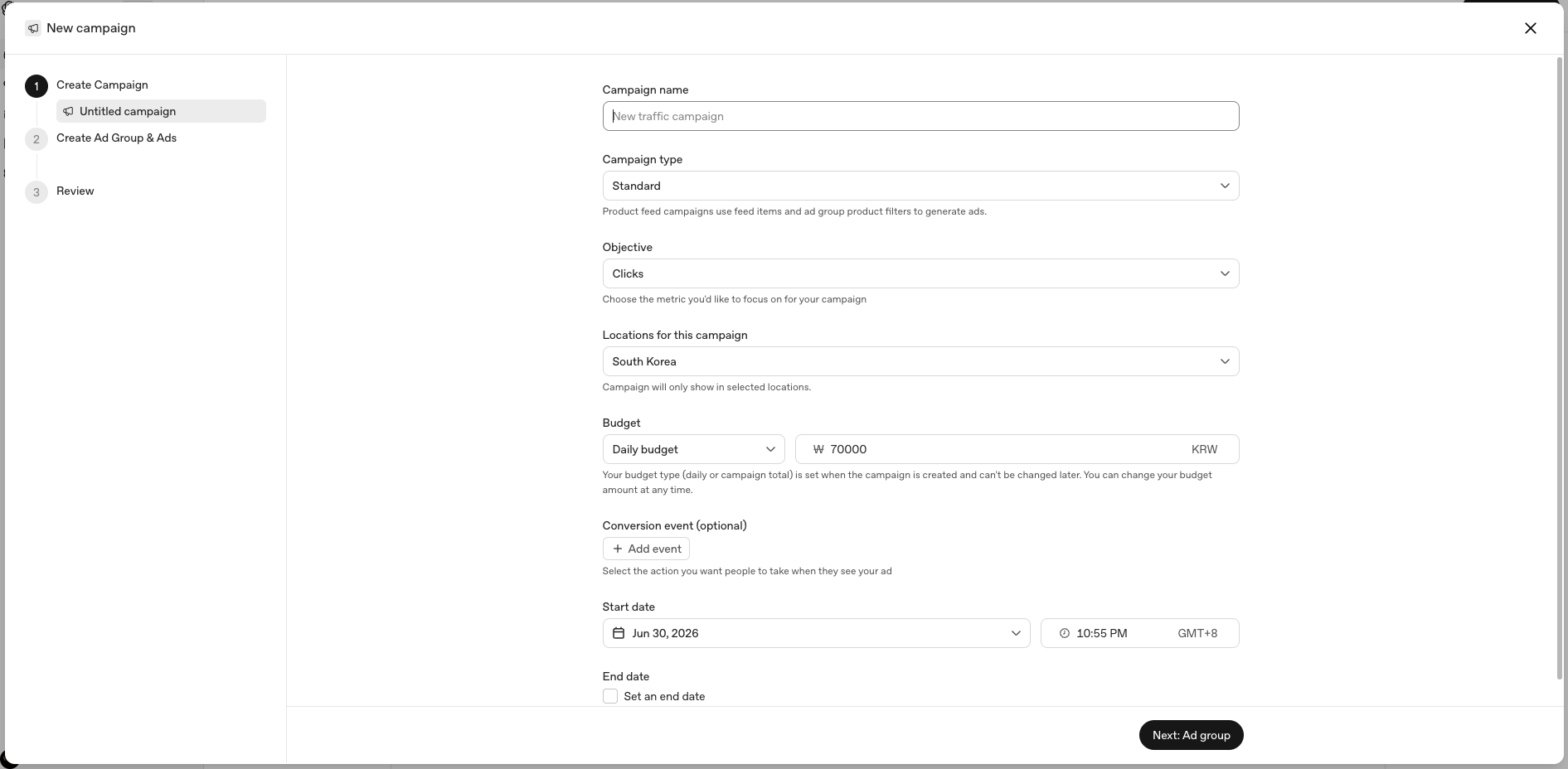
< Example campaign settings screen >
Decide who to show it to (Ad Group): This is where you add the Context Hints (situation sentences) mentioned above, and set how much you’re willing to pay per click (bid). It’s recommended to start at $3–5 per click, but B2B ads can rise to $8–15. If you want to test multiple situations, create multiple ad groups within one campaign and compare them.
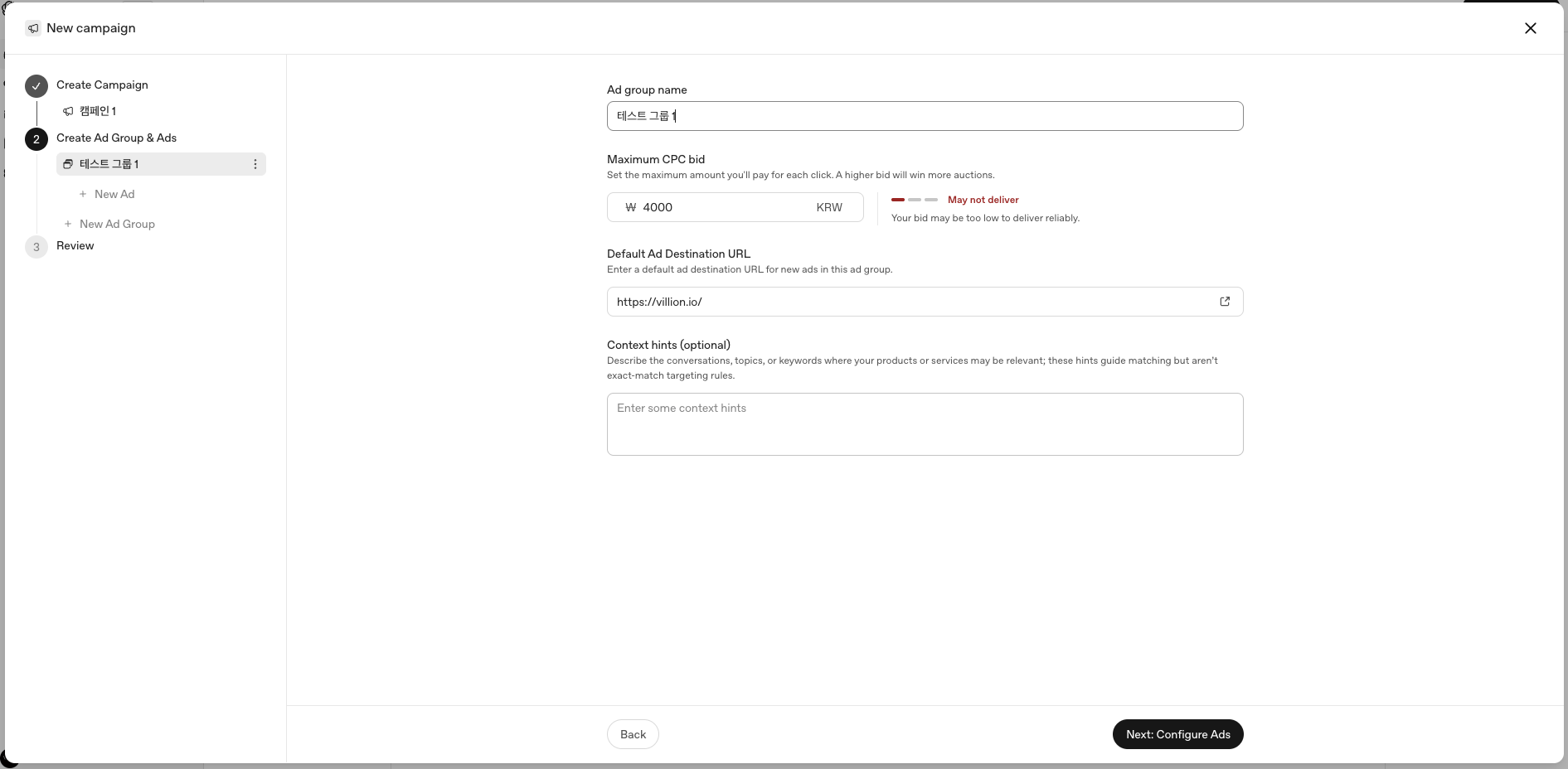
< Example ad group settings screen >
Create the ad copy (Ad): Enter your brand name, title, description, image, and the page people will land on when they click. Rather than overly sensational copy, it’s better to use wording that naturally connects to the user’s concern. Also, what you say in the ad and what the landing page contains must match—otherwise trust breaks. A dedicated page that fits the situation performs better than sending people to your main homepage, and it’s also easier to measure results.
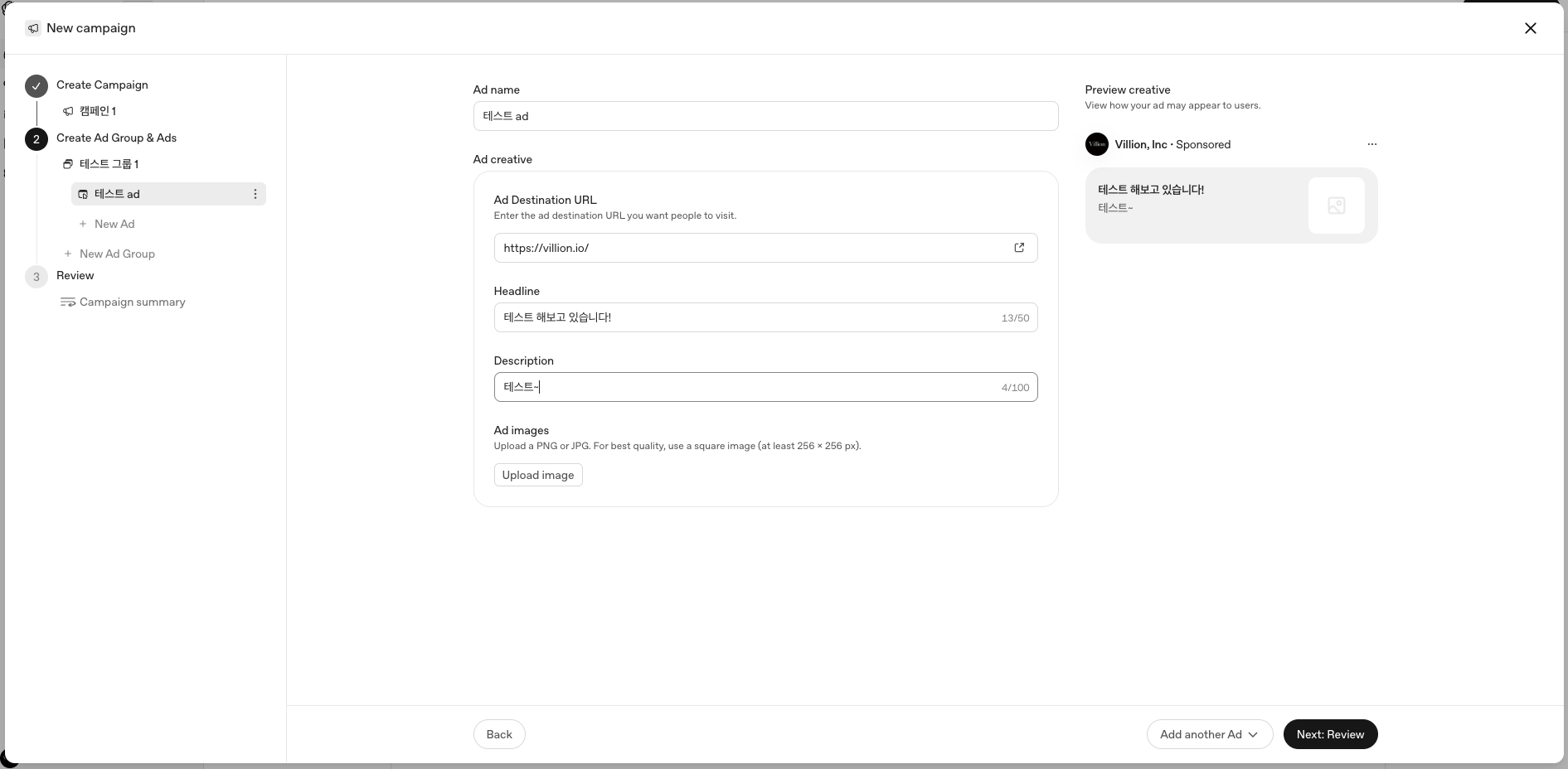
< Example ad settings screen >
5. How do we know what someone did after seeing the ad?
You’ll want to know whether someone who clicked your ad and came to your site signed up or submitted an inquiry. You track that with two tools.
Pixel: A small detector you attach to your website. When a visitor takes an action like sign-up or inquiry, it automatically tells OpenAI, “A conversion happened!” It’s a short piece of code inserted into your site’s
<head>.Conversions API: A backup path for cases like payments or contracts that get confirmed later on your server, or when the pixel misses something.
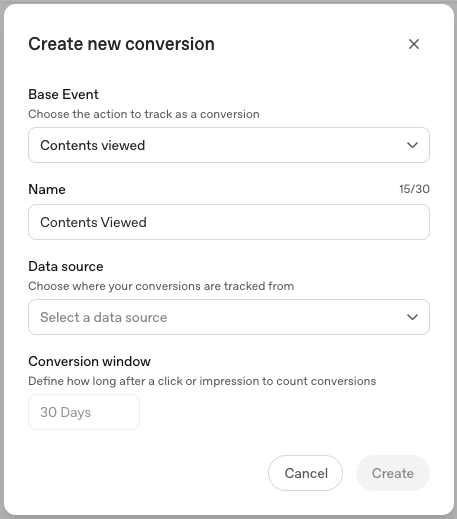
< Example conversion settings screen >
There’s one interesting detail here. When a user clicks an ad, an invisible tag (oppref) is attached to that click. So when that person later does something, the system can recognize, “Ah, they came from ad #3.” That’s how it can distinguish which ad drove the result even if multiple ads use the same link. (It plays the same role as Google’s gclid and Facebook’s fbclid.) For reference, UTMs are for your analytics tools (like GA4) to recognize ChatGPT traffic.
These are the standard conversion event types OpenAI provides. It may look like a lot, but you don’t need to be intimidated—usually you just use one that matches your goal.
Conversion type | When to use it |
|---|---|
lead_created | When an inquiry/consultation request comes in |
registration_completed | When sign-up is completed |
appointment_scheduled | When a consultation time is booked |
trial_started | When a free trial starts |
subscription_created | When a paid subscription starts |
order_created | When a purchase is completed |
The code that reports a conversion should only run on “the screen where that action is actually completed.” For example, like this on a completed inquiry page.
oaiq("measure", "lead_created", { type: "customer_action" });6. Why you shouldn’t look at “clicks” alone
ChatGPT Ads have a unique characteristic you don’t see with other ads. Even if people discover you during a conversation, it’s very common for them not to buy right away and instead come back days later. Industry analysis says about 60% do this. In that case, attribution models that only look at “where did they come from at the last moment” give ChatGPT Ads a zero and credit only a later search or direct visit.
So to see performance properly, it’s best to layer multiple methods.
Pixel: Conversions that happen on the same day as the click
Conversions API: Conversions confirmed later in your server/CRM
UTM + GA4: How they behaved on your site
Short post-conversion survey: Confirm what you missed with “How did you hear about us?”
When you combine these four, the visible share rises from roughly 40% to about 85–95%.
One more tip: for clean optimization, tie your ad optimization to “one single most important goal.” If your goal is lead generation, center everything on inquiries (lead_created) and treat sign-ups/subscriptions as secondary. Especially for B2B services, deals often close weeks later—so send those conversions via server (Conversions API) and give yourself a generous measurement window. Platform numbers are for reference; make your real decisions using customer data (CRM).
7. Common beginner mistakes
Installing the conversion code on every page so even simple visits get counted as “conversions.” → Run conversion code only on the completion screen.
Putting the pixel in
<body>so early visits aren’t tracked. → Put it at the very top of<head>.Using a different name in the code than the conversion name registered in Ads Manager, so results don’t appear. → Make the names match exactly.
Listing only words in Context Hints. → Write situation sentences.
Marking everything as a conversion so optimization gets confused. → Start with one goal.
Always sending traffic to the homepage. → A situation-matched dedicated page is better.
Drawing conclusions too quickly before enough data accumulates. → Give it a little time.
In closing
ChatGPT Ads are a great way to introduce your brand in a new space where people talk with AI. But in an era where AI provides answers, it’s becoming just as important as a paid impression that the AI understands your brand on its own and cites it in answers. Paid ads and the work of making AI mention you naturally (GEO) are like a paired strategy that reaches the same person at different moments. If getting started feels overwhelming, begin by checking what ChatGPT, Perplexity, and Gemini currently say about your brand.
Villion is currently providing ChatGPT Ads analytics features to client companies (Contact us).
Frequently asked questions
Q. Who sees ChatGPT Ads?
They’re shown only to logged-in adults on the Free and Go plans. Paid plan users and minors won’t see them.
Q. Are Context Hints like search keywords?
No. Instead of matching an exact word, they’re signals that describe the situation: “people having this kind of conversation/concern.”
Q. How much does advertising cost?
For impression-based campaigns, it’s about $25–60 per 1,000 impressions. For click-based campaigns, it starts around $3–5 per click, and for B2B it can go up to $8–15.
Q. Do ads change ChatGPT’s answers?
No. Ads and answers are separated.
Q. Why are my GA4 numbers different from Ads Manager?
Because the calculation methods differ. Discrepancies are normal, and you can base final decisions on your own customer data.
Sources
How does your brand show up in AI answers?
Get a brand audit- ChatGPT Ads
- OpenAI Ads
- Advertise in ChatGPT
Daniel
빌리온에서 SEO를 담당하고 있는 Daniel 입니다.
Explore with AI